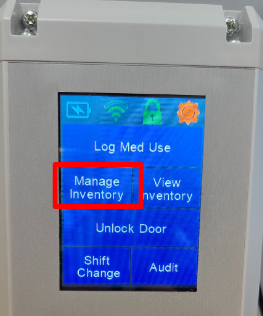
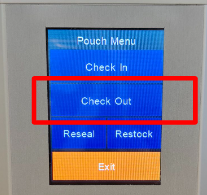
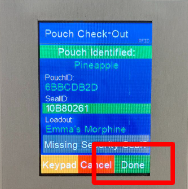
NarcBox - Pouch Check-Out


If Security Seal is intact, scan the seal or enter manually, press 'Done'
If Security Seal is missing/damaged, press 'Missing Security Seal?' and confirm Missing Security Seal by pressing 'Yes'
Press ‘Done’

Related Articles
NarcBox - Pouch Check-In
Press ‘Manage Inventory’ Enter User(s) Credentials - PIN/BIO/RFID Press ‘Check In’ Scan the Pouch RFID or enter manually If Security Seal is intact, scan the seal or enter manually, press 'Done' If Security Seal is missing/damaged, press 'Missing ...
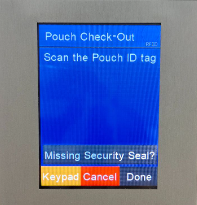
Create (or Delete) a Pouch Loadout
*Before a pouch can be created on your NarcBox HQ, you must create a Pouch Loadout online. Create Pouch Loadout In your online account go to Medications on the left side navigation panel and then select the Pouch Loadout Management tab. *Please read ...
Pouch Transactions, FW 3.40+
Pouch Transactions for NarcBoxes running on Firmware 3.40.00 and above *Printable PDF cards at the bottom of this page Check In/Out Pouch Press ‘Manage Inventory’ Enter User(s) Credentials - PIN/RFID/BIO Press ‘Check In’ or ‘Check Out’ Scan the Pouch ...
NarcBox Firmware Update Changelog
3.43.16 - 1/27/2026 All new event message file and handling implemented Cradlepoint specific enhancement for connection "close" Increased stack size from 12k to 16k for stability Fixed stuck error reports Found and resolve major system interrupts - ...
HQ - Pouch Check In/Check Out
Check In/Out Pouch Select 'Manage Inventory' Enter User(s) Credentials - PIN/RFID/BIO Select 'Pouch' (in top menu), then select 'Check In/Check Out Pouch' Scan Pouch RFID or press 'Enter Manually' Scan Security Seal or press 'Enter Manually' “Is The ...